1. Bubuka
This manual provides essential information for the safe and efficient use of your DOOGEE Note56 Android 16 smartphone. Please read it thoroughly before using your device.

Gambar: Hareup jeung tukang view of the DOOGEE Note56 smartphone, showcasing its design and key specifications like 6150mAh battery, Android 16, 6.56-inch display, and 90Hz refresh rate.
2. Setélan
2.1. Eusi Paket
Pariksa yén pakét anjeun ngandung barang-barang ieu:
- DOOGEE Note56 Smartphone
- Adaptor kakuatan
- Kabel USB
- Alat Ejector SIM
- Kasus pelindung
- Pituduh Mimiti Gancang (manual ieu)
2.2. Kartu SIM sareng Pamasangan Kartu TF
The DOOGEE Note56 supports dual SIM cards and a TF (microSD) card for expandable storage.
- Tangtukeun lokasi baki kartu SIM di sisi alat.
- Selapkeun alat SIM ejector kana liang leutik gigireun baki terus pencét gently dugi baki pops kaluar.
- Place your Nano-SIM cards and/or TF card into the designated slots on the tray. Ensure the gold contacts face downwards.
- Taliti selapkeun deui baki kana telepon nepi ka ngaklik kana tempatna.
2.3. Daya Awal Hurung jeung Konfigurasi Dasar
- Pencét terus tahan tombol Daya nepi ka logo DOOGEE némbongan.
- Turutan ajakan dina layar pikeun milih basa anjeun, sambungkeun ka jaringan Wi-Fi, sareng nyetel akun Google anjeun.
- Configure security settings such as screen lock (PIN, pattern, password) and face recognition.
2.4. Ngecas Alat
Connect the USB cable to the power adapter and then to the phone's charging port. Plug the adapter into a power outlet. The battery indicator will show charging status. For optimal battery life, use the provided charger.
3. Parentah Operasi
3.1. Sistem Operasi Android 16
The DOOGEE Note56 runs on the latest Android 16 system, offering an optimized and intuitive user experience. It features improved application launch speeds, enhanced responsiveness, and a refined user interface. A new Privacy Space function allows for hiding sensitive data and applications, ensuring secure usage.

Gambar: Leuwihview of the Android 16 operating system interface, displaying various applications, settings menus, and system information.
3.2. Fitur tampilan
The device is equipped with a 6.56-inch IPS waterdrop display, providing a smooth visual experience with a 90Hz high refresh rate. The 720x1612 HD+ resolution and 90% screen-to-body ratio enhance viewing of movies and videos. Two eye-friendly modes are included to reduce eye strain during prolonged use.

Gambar: A close-up view of the DOOGEE Note56's 6.56-inch IPS display, illustrating its vibrant colors and the smooth 90Hz refresh rate.
3.3. Fungsi kaméra
Capture vivid and beautiful photos with the 8MP main camera and take clear selfies with the 5MP front camera. The device utilizes AI functions for enhanced photography, including:
- Pangakuan Adegan AI: Automatically detects and optimizes settings for 12 different scenes.
- Modeu wengi: Ningkatkeun kualitas poto dina kondisi cahaya remen.
- Modeu Potrét: Nyiptakeun poto anu katingalina profésional kalayan latar tukang anu burem.
- HDR: Enhances dynamic range for balanced exposure.
- Modeu Pro: Nawiskeun kontrol manual kana setélan kaméra.
- Seuri Capture: Otomatis nyokot poto nalika aya seuri nu kadeteksi.
- Panorama: Captures wide-angle scenic shots.
- Shooting kontinyu: Nyokot sababaraha poto dina suksesi gancang.
- Fun Filters: Apply various creative effects to your photos.

Image: Diagram illustrating the 8MP rear camera and 5MP front camera specifications, along with icons representing various AI scene recognition modes.

Image: The camera interface of the DOOGEE Note56, highlighting features like HDR, Pro Mode, Smile Capture, Panorama, Continuous Shooting, Night Mode, and Fun Filters, with a samppoto éta.

Image: The 5MP front camera's capabilities for selfies, demonstrating Beauty Mode and Portrait Effect for bright, natural, and shareable self-portraits.
3.4. Mémori jeung Panyimpenan
The DOOGEE Note56 is equipped with 24GB RAM (3GB physical RAM + 21GB extended RAM) and 64GB of internal storage (ROM). It supports TF card expansion up to 2TB, providing ample space for photos, videos, and applications. This powerful memory configuration ensures smooth multitasking and minimizes lag during gaming or heavy app usage.

Gambar: Hiji internal view diagram highlighting the 64GB ROM and 24GB RAM (composed of 3GB physical and 21GB extended RAM) for seamless performance.
3.5. Konéktivitas sareng Navigasi
The device supports Bluetooth 4.2 for stable wireless connections and 4G Dual SIM for broad network compatibility both domestically and internationally. For navigation, it integrates three major positioning systems: GPS, GLONASS, and Galileo, ensuring accurate location services from urban areas to remote locations.
3.6. Fitur Smart séjén
- Instant Face Recognition: Unlock your device quickly and securely using your face.
- Radio FM: Enjoy local radio stations without an internet connection.
- Jack Headphone 3.5mm: Connect your wired headphones for audio playback and calls.
- Smart Body Sensor: (Specific functionality not detailed, refers to general smart sensor capabilities).
- Modeu Sistem Ganda: Allows for separate user environments.
- Papan klip Super: Enhanced clipboard functionality.
- Screen Optimization & Color Customization: Adjust display settings for personal preference.

Image: Visual representation of instant face recognition, accurate GPS navigation, and the FM radio interface on the DOOGEE Note56.

Gambar: Témbongkeun kolasecasing various smart OS features of the DOOGEE Note56, including smart body sensor, dual system mode, super clipboard, RAM expansion, screen optimization, and screen color customization.
4. Pangropéa
4.1. Manajemén batré
The DOOGEE Note56 features a 6150mAh large capacity battery, designed for extended use. It supports approximately 1000 charge/discharge cycles and offers up to 4 years of durable battery life. The device also supports 5W reverse charging, allowing it to act as a power bank for other devices.
- Pikeun ngamaksimalkeun umur batré, hindari suhu anu ekstrim.
- Ulah pinuh discharge batre rutin.
- Use the original charger for optimal charging performance.
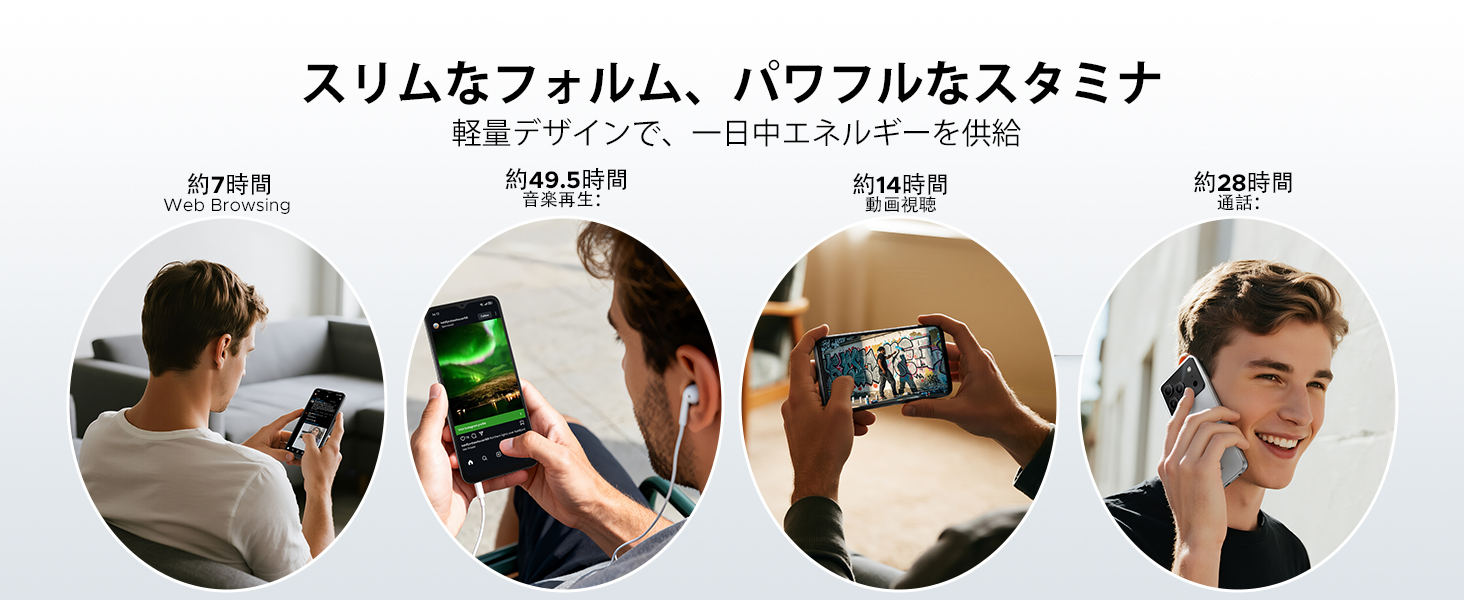
Image: Diagram illustrating the 6150mAh silicon-carbon battery, highlighting its features such as 1000 charge cycles, 4 years of durability, 20% smaller size, and 5W reverse charging capability.

Image: Infographic showing estimated battery life for different activities on the DOOGEE Note56: approximately 7 hours for web browsing, 49.5 hours for music playback, 14 hours for video watching, and 28 hours for calls.
4.2. beberesih sarta perawatan
- Anggo lawon anu lemes sareng henteu lint pikeun ngabersihan layar sareng awak alat.
- Hindarkeun ngagunakeun bahan kimia anu kasar atanapi bahan abrasive.
- Keep the device away from excessive dust and moisture.
4.3. Apdet parangkat lunak
Regularly check for and install software updates to ensure your device has the latest features, security patches, and performance improvements. You can usually find this option in the device's settings under 'System' or 'About phone'.
5. Cara ngungkulan
If you encounter issues with your DOOGEE Note56, refer to the following common troubleshooting steps:
- Alat teu hurung: Pastikeun batréna tos dicas. Pencét terus tahan tombol Daya sahenteuna 10-15 detik pikeun maksa ngamimitian deui.
- Aplikasi nabrak atanapi katirisan: Close and reopen the app. Clear the app's cache and data in Settings > Apps. If the issue persists, uninstall and reinstall the app.
- Masalah konektipitas jaringan: Check if Airplane Mode is off. Restart the device. Verify your SIM card is correctly inserted and your mobile data plan is active. For Wi-Fi, try forgetting the network and reconnecting.
- Masalah ngecas: Ensure the charging cable and adapter are securely connected and undamaged. Try a different outlet or charger. Clean the charging port gently.
- kinerja slow: Tutup aplikasi latar tukang anu teu perlu. Hapus cache sacara teratur. Pertimbangkeun ngosongkeun rohangan panyimpen.
Pikeun masalah anu langkung rumit, mangga tingali bagian dukungan.
6. Spésifikasi
| Fitur | Spésifikasi |
|---|---|
| Ukuran layar | 6.56 inci |
| Kapasitas batré | 6150 mAh |
| Warna | Black (other variants available) |
| Ngaran Brand | DOOGEE |
| Produsén | DOOGEE |
| Release Taun | 2025 |
| Komponén Kaasup | Adaptor kakuatan |
| OS cocog | Android 16 |
| Fitur séjén | SIM-free |
| Ngaran modél | CATETAN56 |
| Tipe tampilan | IPS |
| Ukuran Paket | 19.3 x 10.5 x 5.1 cm; 410 g |
| Rujukan Produsén | CATETAN56 |
| Ukuran RAM anu dipasang | 24 GB |
| Kapasitas Panyimpenan Mémori | 64 GB |
7. Garansi jeung Rojongan
7.1. Émbaran jaminan
The DOOGEE Note56 comes with a garansi 1 taun from the date of purchase, ensuring peace of mind for your usage. This warranty covers manufacturing defects under normal use conditions.
7.2. Kumaha Ngahubungan Rojongan
In the unlikely event of a product defect or if you require technical assistance, please contact our support team through the following methods:
- Via Amazon Purchase History: Navigate to your Amazon purchase history and contact our store directly regarding your order.
- Ngaliwatan Kaca Produk: On the product page, click on the store name located below the 'Add to Cart' button. Then, click the 'Ask a Question' button displayed in the upper right corner to send us an inquiry.


