1. Bubuka
Thank you for choosing the GOBOULT Z40 V2.0 Truly Wireless In-Ear Earbuds. This manual provides essential information to help you set up, operate, and maintain your earbuds for optimal performance. Please read these instructions carefully before use and retain them for future reference.
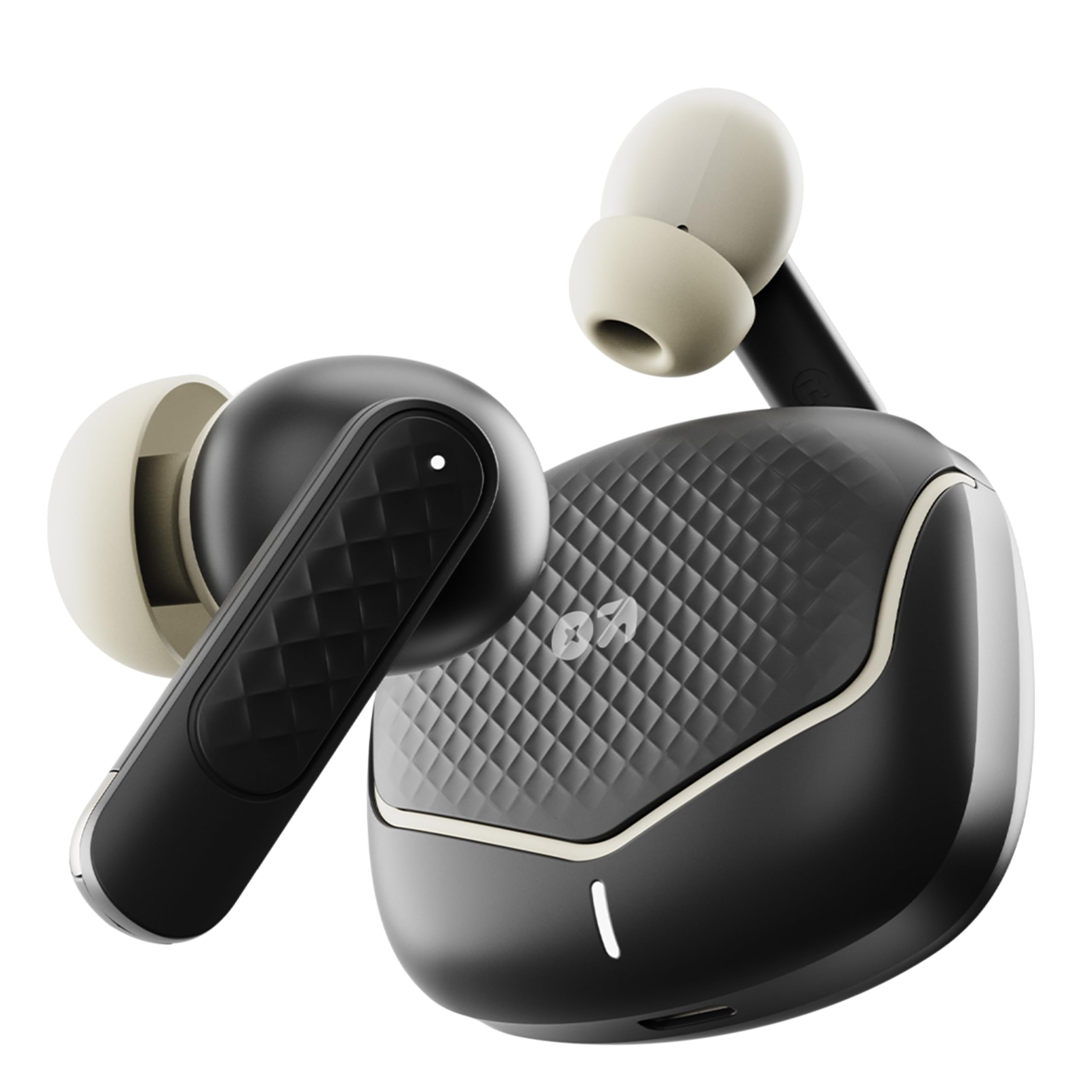
Image: The GOBOULT Z40 V2.0 earbuds with their charging case, showcasing desain anu ramping.
2. Eusi Paket
Pastikeun sadaya item aya dina bungkusan:
- GOBOULT Z40 V2.0 Earbuds (Left and Right)
- Ngecas Case
- Kabel Ngecas USB Tipe-C
- Eartips (rupa-rupa ukuran)
- Manual pangguna (dokumén ieu)
- Kartu Garansi
3. Produk Langkungview
The GOBOULT Z40 V2.0 earbuds feature a compact design with advanced audio technology. Key components include:
- Earbuds: Equipped with 13mm dynamic drivers for enhanced bass and clear audio. Each earbud includes touch control sensors and multiple microphones for Environmental Noise Cancellation (ENC).
- Kasus ngecas: Provides extended battery life and protects the earbuds. Features a USB Type-C charging port and an LED indicator.
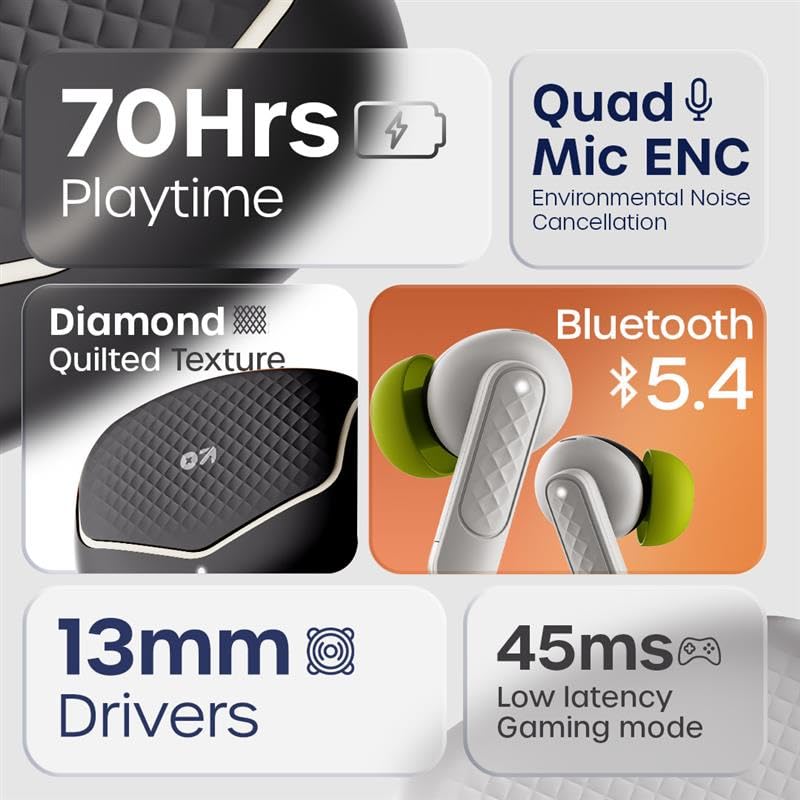
Image: An infographic highlighting key features such as 70 hours playtime, Quad Mic ENC, Bluetooth 5.4, 13mm drivers, and 45ms low latency.

Image: The iconic V-Flip charging case and earbuds displayed in Opal Black, Onyx Grey, Solar Orange, and Arctic Blue color options.
4. Setélan
4.1. Ngecas Earbuds jeung Case
Saméméh dipaké munggaran, eusian pinuh ku earbuds jeung wadah ngecas.
- Teundeun earbuds kana wadah ngecas.
- Sambungkeun kabel ngecas USB Type-C ka port ngecas dina casing sareng ka sumber listrik.
- Indikator LED dina wadahna bakal némbongkeun status ngecas. Sakali dicas pinuh, indikator bakal robah atanapi pareum.
A 10-minute charge provides approximately 120 minutes of playtime. The case provides up to 70 hours of total playtime with multiple charges.

Image: Visual representation of the charging case and earbuds, highlighting 70 hours battery life and fast charging capability (10 mins charge = 120 mins playtime).
4.2. Nyapasangkeun sareng Alat
The GOBOULT Z40 V2.0 uses Bluetooth 5.4 for quick and reliable pairing.
- Buka wadah ngecas. Earbuds bakal otomatis asup kana mode papasangan.
- Dina alat anjeun (smartphone, tablet, laptop), aktipkeun Bluetooth.
- Milarian pikeun available Bluetooth devices and select "GOBOULT Z40 V2.0" from the list.
- Sakali disambungkeun, sora konfirmasi bakal diputer, sarta earbuds bakal siap dipaké.
The earbuds feature Blink&Pair™ technology for quicker pairing.

Image: The charging case open with earbuds, illustrating the upgraded Bluetooth v5.4 for quicker pairing and higher reliability with Blink&Pair™ Tech.
5. Parentah Operasi
5.1. Toél Kontrol
The earbuds feature intuitive touch controls for managing audio and calls:
| Aksi | Fungsi |
|---|---|
| Ketok Tunggal (Kénca/Katuhu) | Puter / Reureuh Musik, Jawab / Tungtung Telepon |
| Ketok dua kali (Katuhu) | Lagu salajengna |
| Ketok dua kali (Kénca) | Lagu saméméhna |
| Ketok Triple (Kénca/Katuhu) | Aktipkeun Asisten Sora |
| Pencét Panjang (Kénca/Katuhu) | Nolak Telepon |
| Pencét lila (Kénca/Katuhu, 2 detik) | Toggle Gaming Mode (Low Latency) |

Image: A user interacting with the earbuds to activate voice assistant, demonstrating hands-free control. Also highlights the IPX5 water resistance.
5.2. Nyieun jeung Nampa Telepon
The Z40 V2.0 earbuds are equipped with Quad Microphones and Environmental Noise Cancellation (ENC) for clear call quality.
- Ngajawab Telepon: Ketok tunggal boh earbud.
- Tungtung Telepon: Ketok sakali salah sahiji earbud nalika nelepon.
- Nolak Telepon: Pencét lila salah sahiji earbud.
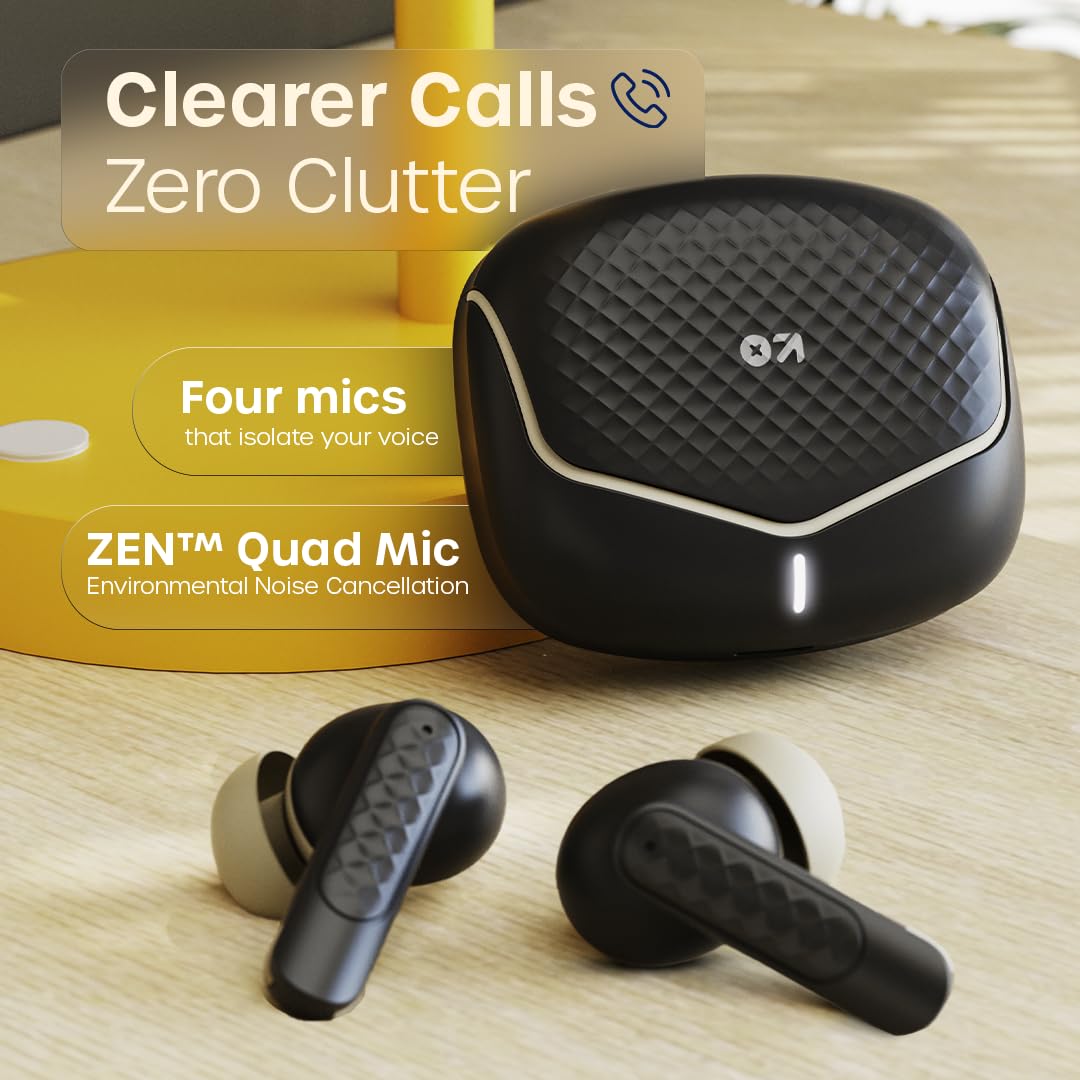
Image: The charging case and earbuds, emphasizing the ZEN™ Quad Mic Environmental Noise Cancellation for clearer calls.
5.3. Gaming Mode (Low Latency)
Activate Gaming Mode for reduced audio latency, ideal for gaming and video playback.
- Aktipkeun / Nonaktipkeun: Pencét lila boh earbud salila 2 detik.
This mode provides a 45ms low latency experience for synchronized audio and visuals.

Image: Earbuds and charging case near a gaming console, illustrating the 45ms low latency Combat™ Gaming Mode for faster responses.
6. Pangropéa
6.1. beberesih
Pembersihan rutin ngabantosan ngajaga kualitas sora sareng kabersihan.
- Anggo lawon anu lembut, garing, henteu lint pikeun ngusap earbuds sareng wadah ngecas.
- Gently remove any earwax or debris from the eartips and speaker mesh using a small brush or cotton swab.
- Ulah make cleaners abrasive, alkohol, atawa pangleyur kimiawi.
6.2. Panyimpenan
Lamun teu dipake, nyimpen earbuds dina wadah ngecas maranéhanana pikeun ngajaga eta tina lebu, karuksakan, jeung ngajaga eta dicas.
6.3. Tahan cai (IPX5)
The GOBOULT Z40 V2.0 earbuds are IPX5 water-resistant, meaning they can withstand sweat and light splashes of water. They are not designed for submersion in water or for use during swimming. Ensure earbuds are dry before placing them back in the charging case to prevent damage.
7. Cara ngungkulan
Upami anjeun mendakan masalah, cobian solusi ieu:
| Masalah | Solusi |
|---|---|
| Earbuds teu dipasangkeun | Ensure earbuds are charged. Turn off and on Bluetooth on your device. Forget "GOBOULT Z40 V2.0" from your device's Bluetooth list and re-pair. |
| Ngan hiji earbud jalan | Place both earbuds back in the charging case, close the lid, then open again. Ensure both earbuds are charged. Re-pair with your device. |
| Volume lemah atawa kualitas sora goréng | Adjust volume on your device. Clean the speaker mesh and eartips. Try different sized eartips for a better seal. |
| Masalah ngecas | Ensure the charging cable is securely connected. Try a different USB port or power adapter. Clean the charging contacts on both earbuds and case. |
| Toél kadali teu responsif | Pastikeun ramo anjeun bersih sareng garing. Pasang deui earbud ku cara nempatkeun kana wadahna teras cabut. |
8. Spésifikasi
Technical details of the GOBOULT Z40 V2.0 Earbuds:
| Fitur | Rincian |
|---|---|
| Ngaran modél | Z40 V2.0 (Airbass Earbuds) |
| Konektipitas | Bluetooth v5.4 |
| Rentang Bluetooth | 10 Méter |
| Ukuran Supir Audio | 13mm Supir dinamis |
| Mikropon | Quad Mic sareng Pembatalan Noise Lingkungan (ENC) |
| Latén Audio | 45 Milidetik (Modeu Kaulinan) |
| Kahirupan Batré (Total) | Nepi ka 70 Jam (kalayan wadah ngecas) |
| Waktu Ngecas | Fast Charging (10 mins charge for 120 mins playtime) |
| Port ngecas | USB Tipe-C |
| Tahan cai | IPX5 |
| Métode kontrol | Toél Control |
| Réspon Frékuénsi | 20 Hz |
| Sensitipitas | 115 dB |
| Item Beurat | 600 g (Product + Packaging) |
| Dimensi produk | 5.8 x 4 x 4.9 cm |
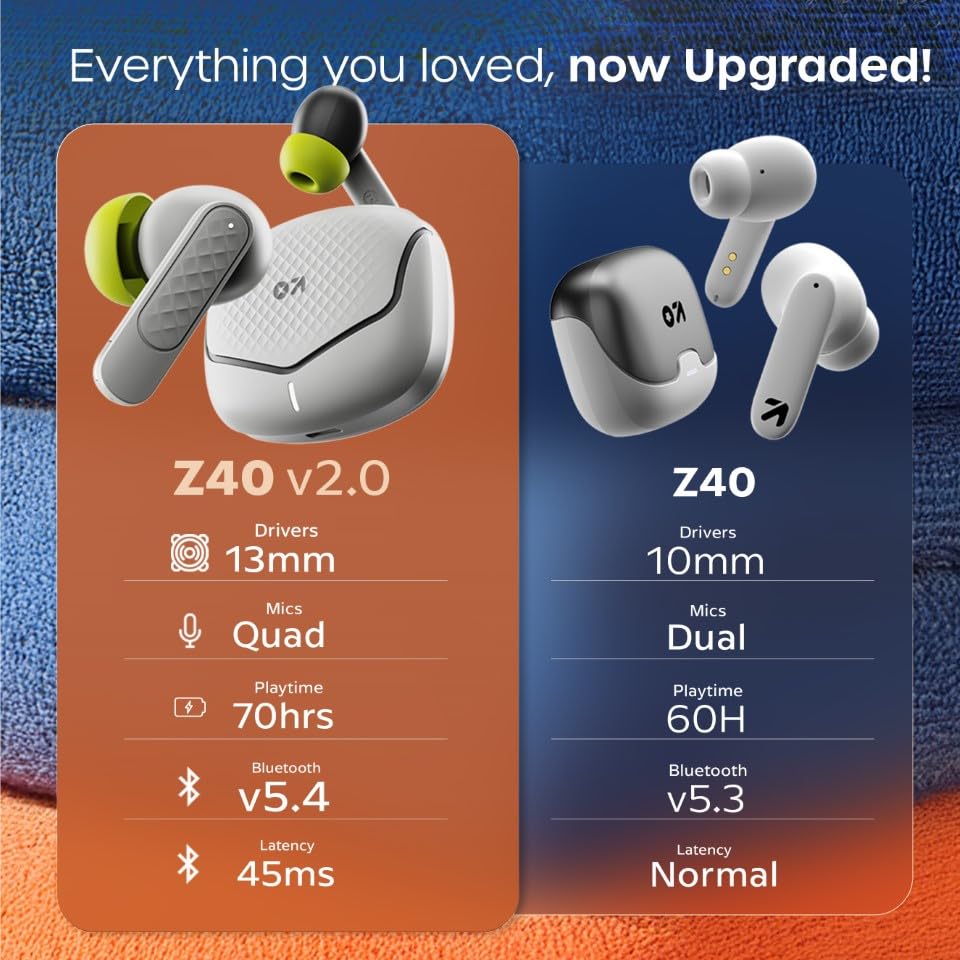
Image: A comparison table showing upgrades from Z40 to Z40 V2.0, including 13mm drivers, Quad Mics, 70hrs playtime, Bluetooth v5.4, and 45ms latency.
9. Jaminan & Dukungan
The GOBOULT Z40 V2.0 earbuds come with a 1-taun jaminan produsén urang from the date of purchase. This warranty covers manufacturing defects and ensures trusted quality and durability.
For warranty claims, technical support, or any product-related inquiries, please refer to the contact information provided on your warranty card or visit the official GOBOULT support websitus.
Pabrikan: GOBOULT, B-67 Wazirpur Industrial Area, New Delhi 110052, India


