Bubuka
Thank you for choosing the Grundig 3-in-1 Wireless Charging Station. This device is designed to provide a convenient and efficient way to charge your Qi-compatible smartphone, smartwatch, and wireless earbuds simultaneously. Please read this manual carefully before use to ensure proper operation and to maximize the lifespan of your product.
Émbaran Kasalametan
- Ulah ngabongkar atawa ngaropéa alat.
- Jauhkeun alat tina cai, beueus, sareng suhu anu luhur.
- Hindarkeun ragrag atanapi ngagentoskeun alat kana tabrakan anu kuat.
- Use only certified power adapters that meet the specified input requirements (5V/2A or 9V/1.67A).
- The charging station features integrated protection against overcharge, overheating, and overvoltage pikeun mastikeun operasi aman.
- Do not place metal objects or magnetic cards on the charging surface, as this may interfere with charging or damage the device.
Eusi pakét
- 1x Grundig 3-in-1 Wireless Charging Station
- 1x Kabel Ngecas USB-C
- 1 x Manual Pamaké
Produk Leuwihview
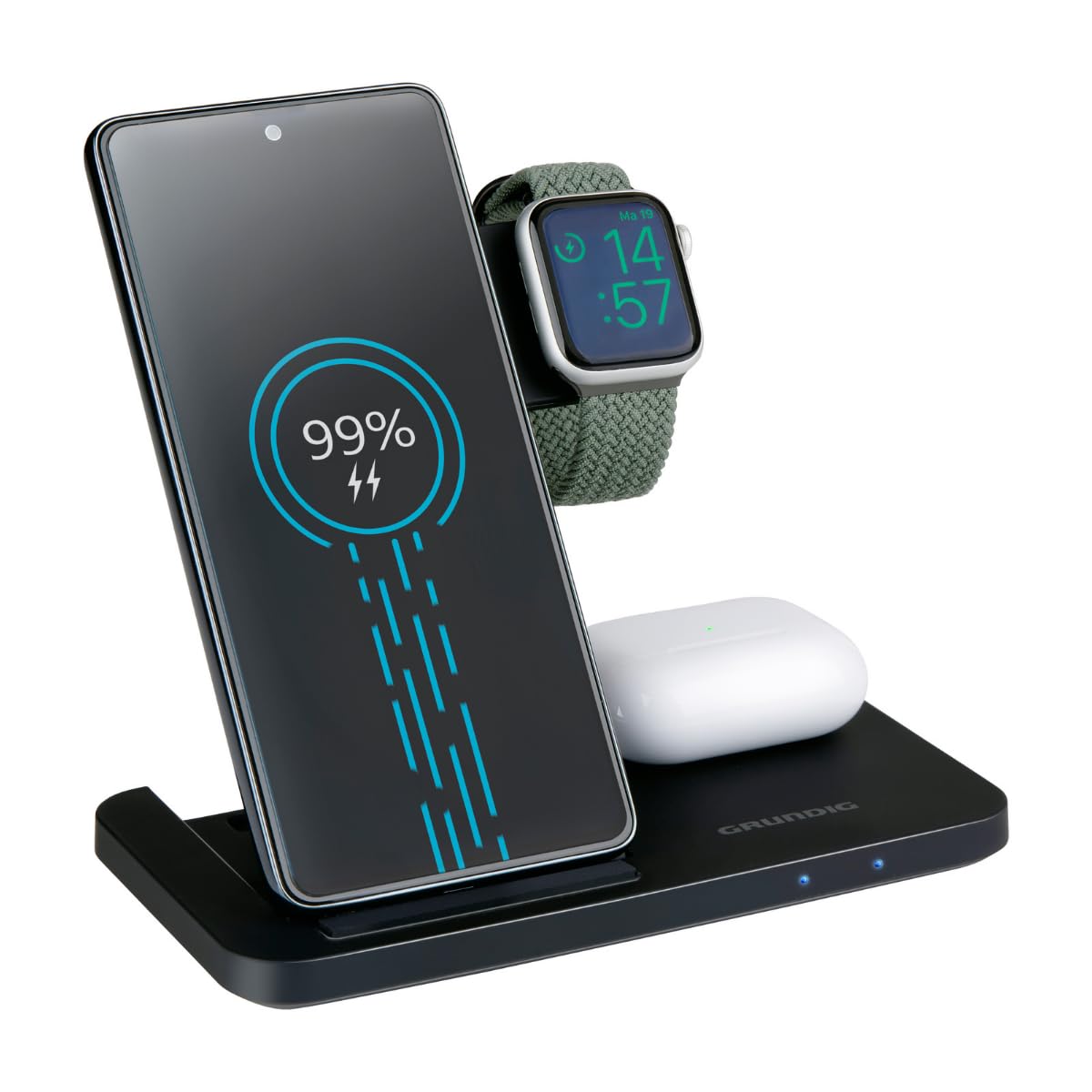
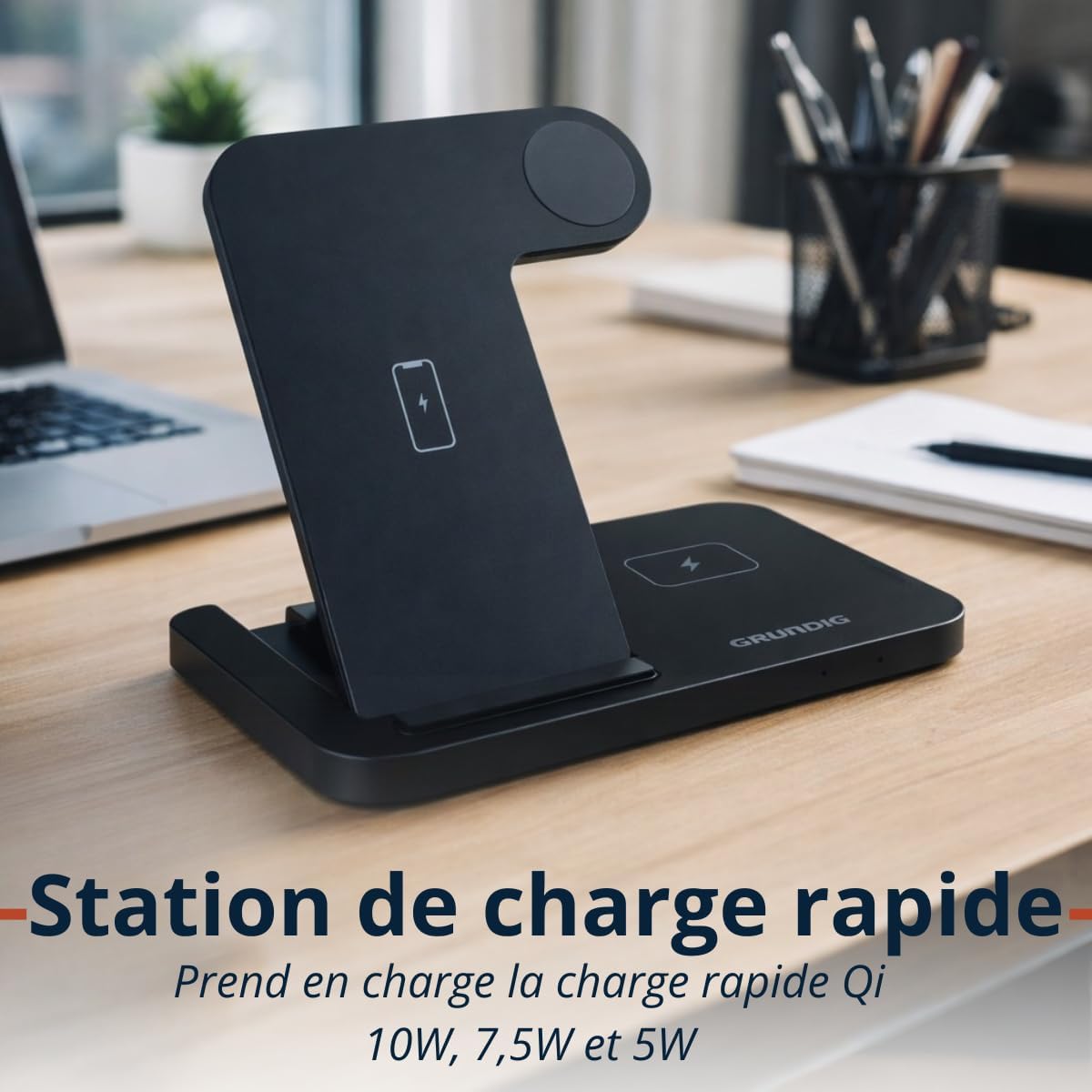
The Grundig 3-in-1 Wireless Charging Station is designed for convenience and efficiency. It features a foldable design for portability and three dedicated charging zones for your smartphone, smartwatch, and wireless earbuds.

Disetél
- Unpack the Grundig 3-in-1 Wireless Charging Station and the USB-C cable.
- Connect the provided USB-C cable to the input port on the charging station.
- Connect the other end of the USB-C cable to a compatible power adapter (not included). Ensure the power adapter meets the input specifications (5V/2A or 9V/1.67A) for optimal performance, especially for fast charging.
- Place the charging station on a stable, flat surface.
Parentah Operasi
Ngecas Alat Anjeun
- Smartphone Charging: Place your Qi-compatible smartphone vertically on the designated smartphone charging pad. Ensure the phone is centered for proper alignment. The charging station supports 10W, 7.5W, and 5W wireless charging for smartphones.
- Ngecas Smartwatch: Place your Apple Watch or other compatible smartwatch on the dedicated smartwatch charging module. The module provides 2W charging output.
- Ngecas Earbuds: Place your wireless earbuds case on the designated earbuds charging pad. This pad provides 5W charging output.
Indikator LED
The charging station is equipped with LED indicators to show the charging status of your devices. Refer to the product's specific LED behavior for detailed status information (e.g., solid light for charging, blinking for error, off for fully charged or no device).

Pangropéa
- To clean the charging station, disconnect it from the power source and wipe it with a soft, dry cloth.
- Ulah nganggo pembersih abrasif, pangleyur, atanapi bahan kimia anu keras, sabab ieu tiasa ngaruksak permukaan atanapi komponén internal.
- Ensure the charging pads are free from dust and debris to maintain optimal charging efficiency.
Pamérésan masalah
- Alat teu ngecas:
- Pastikeun stasiun ngecas disambungkeun kalayan leres kana sumber daya.
- Pariksa yén alat anjeun cocog sareng Qi.
- Check if the device is correctly aligned on the charging pad. Remove any thick cases that might interfere with wireless charging.
- Coba nganggo kabel USB-C sareng adaptor daya anu béda.
- Ngecas lalaunan:
- Ensure you are using a power adapter that supports fast charging (e.g., a Quick Charge 3.0 or Power Delivery adapter).
- Confirm proper alignment of the device on the charging pad.
- Indikator LED teu jalan:
- Pariksa sambungan daya ka stasiun ngecas.
- Upami masalahna tetep, hubungi dukungan palanggan.
spésifikasi
| merek | grundig |
| Modél | Stasion Ngecas Wireless 3-in-1 |
| Input | USB-C 5V / 2A, 9V / 1.67A |
| Smartphone Output | 10W / 7.5W / 5W (Qi) |
| Smartwatch Output | 2W |
| Kaluaran Earbuds | 5W |
| Ukuran (dilipat) | Kira-kira. 140 × 70 × 14 mm |
| Beurat | Kira-kira. 150 g |
| Wireless Charging Zones | Smartphone, Smartwatch, Earbuds |
| Kasaluyuan | Qi-enabled smartphones, Apple Watch, other smartwatches, wireless earbuds |
| Fitur panyalindungan | Overcharge, Overheat, Overvoltage panyalindungan |
Émbaran jaminan
This Grundig 3-in-1 Wireless Charging Station comes with a manufacturer's warranty of 2 taun ti tanggal beuli. Garansi ieu nyertakeun cacad dina bahan sareng pagawean dina panggunaan normal.
The warranty does not cover damage caused by misuse, accidents, unauthorized modifications, or failure to follow the instructions in this manual. Please retain your proof of purchase for warranty claims.
For full warranty terms and conditions, please refer to the official Grundig websitus atanapi ngahubungan rojongan customer.
Ngarojong
If you encounter any issues or have questions regarding your Grundig 3-in-1 Wireless Charging Station that are not addressed in this manual, please visit the official Grundig website for further assistance or contact their customer support.
Anjeun tiasa mendakan langkung seueur inpormasi sareng sumber dukungan ku nganjang ka GRUNDIG Brand Store.