1. Bubuka
This manual provides essential information for the safe installation, operation, and maintenance of your PowMr Hybrid Solar Inverter 12000W. Please read this manual thoroughly before installation and operation to ensure optimal performance and safety. Keep this manual for future reference.
2. Émbaran Kasalametan
WARNING: This inverter generates high voltage. Installation and maintenance must be performed by qualified personnel only. Failure to follow these instructions may result in serious injury or death.
- Do not attempt to disassemble or repair the inverter yourself. Contact qualified service personnel.
- Ensure all wiring is correctly sized and installed according to local and national electrical codes.
- Disconnect all power sources (PV, battery, AC input) before performing any maintenance or wiring.
- Install the inverter in a well-ventilated, dry, and cool environment, away from flammable materials.
- Pastikeun grounding ditangtoskeun tina inverter nu.
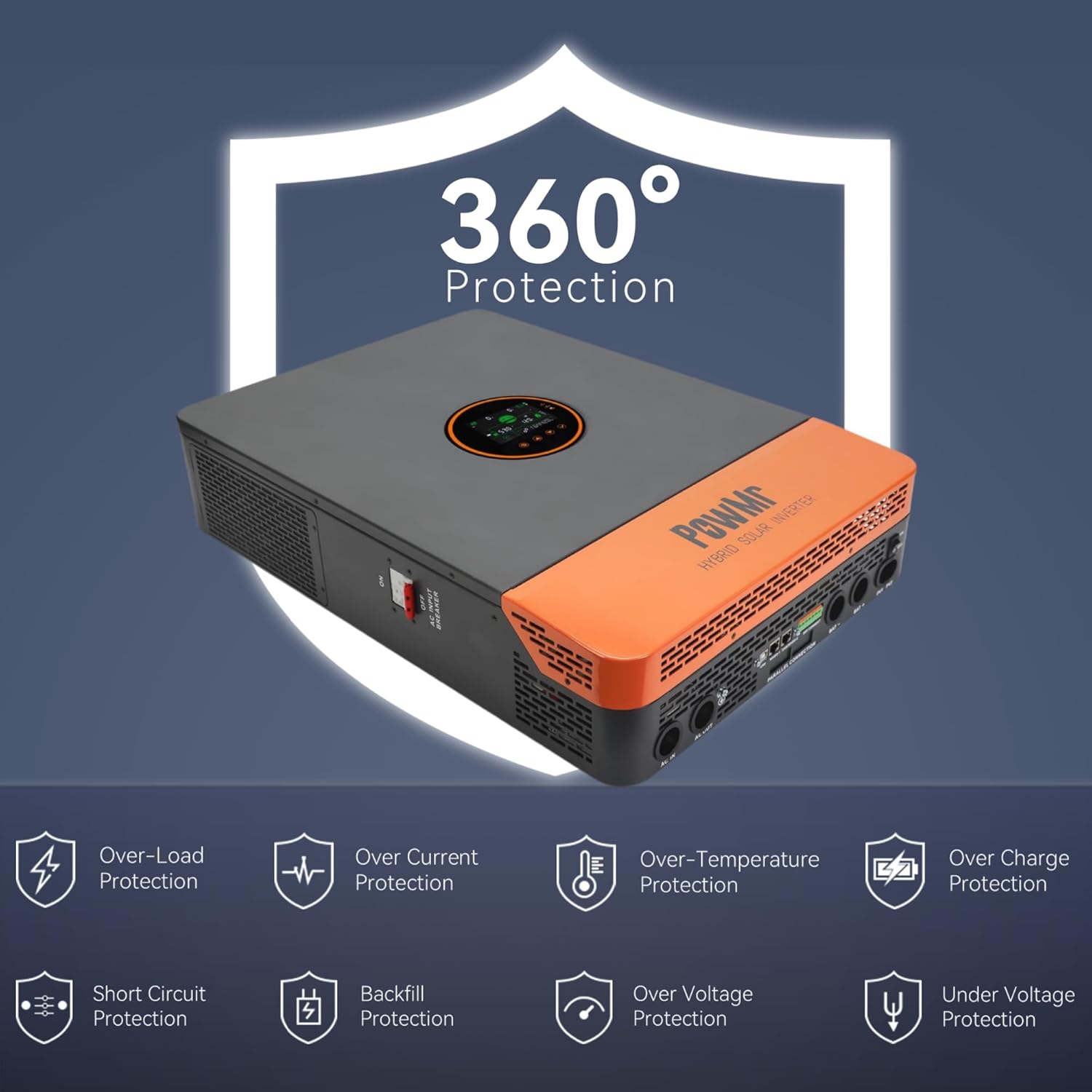
Figure 2.1: The inverter features comprehensive protection against over/under voltage, overload, short circuit, over-temperature, and anti-backfeed.
3. Produk Langkungview
3.1 Fitur konci
- Kaluaran: 12000W continuous (24000W peak), 120/240Vac split-phase output.
- Input PV: Maximum 6600W PV input power, 500V DC maximum, 22A. PV starting voltage: ≥150V.
- MPPT Charger: Dual 100A MPPT chargers, max 200A charge current.
- Kasaluyuan batré: Supports 48V Li-ion, Lead-Acid, and user-defined battery types.
- Battery-Less Mode: Capable of powering loads directly from PV/AC without a battery connected.
- Parallel Operation: Supports up to 6 units in parallel for increased power output.
- Ngawaskeun: Large LCD display, dynamic flow diagrams, and optional WiFi for remote monitoring via mobile app.
- Palabuhan Komunikasi: RS485, CAN, USB interfaces for integration with battery BMS, generator ATS, and smart home systems.

Gambar 3.1: Leuwihview of the 12KW Split-Phase Hybrid Solar Inverter's main features and capabilities.
3.2 Product Appearance and Components
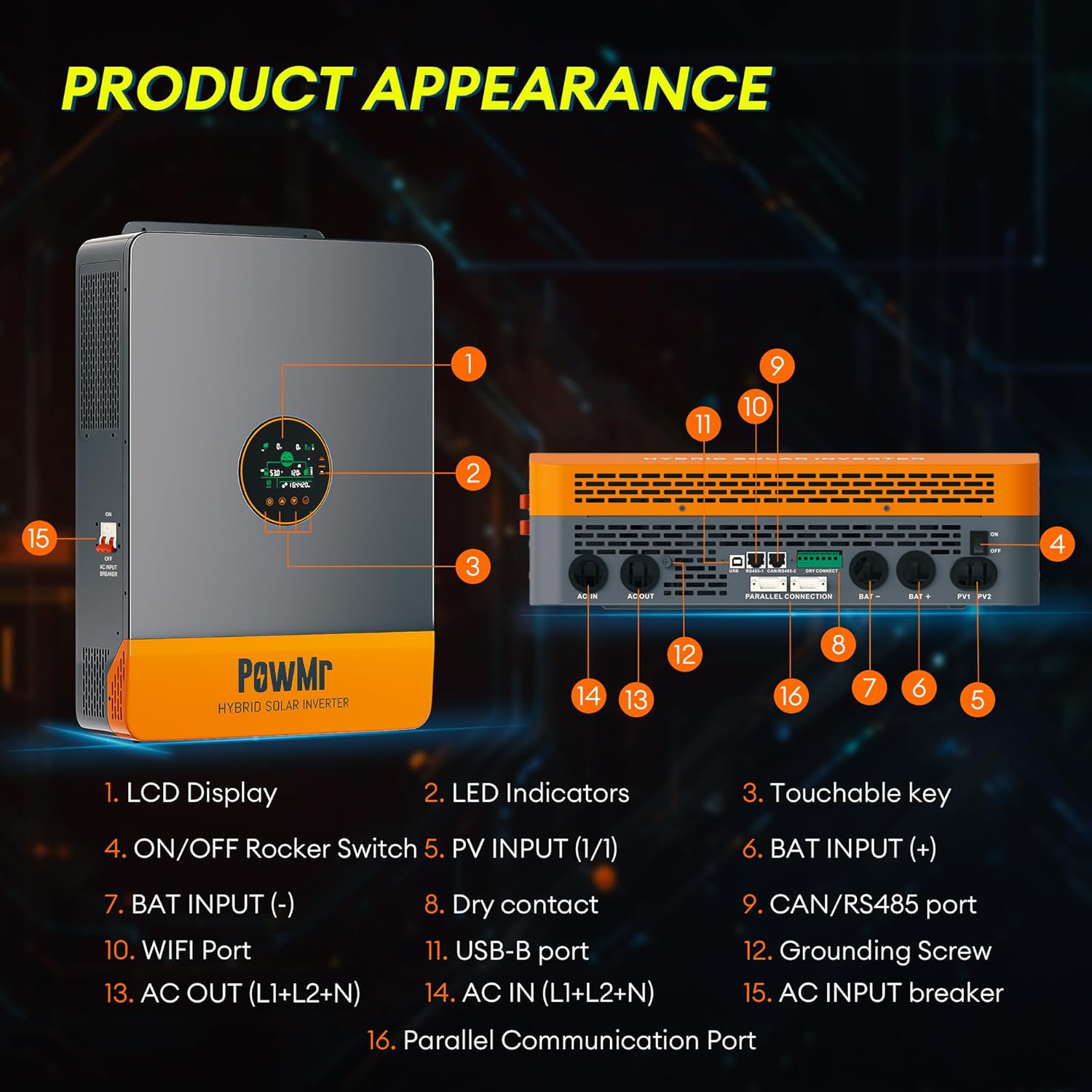
Gambar 3.2: Hareup jeung sisi view tina inverter kalayan komponén anu dilabélan.
- Témbongkeun LCD
- Indikator LED
- Touchable Key
- ON / OFF Rocker Switch
- PV INPUT (1/1)
- BAT INPUT (+)
- BAT INPUT (-)
- Kontak garing
- CAN/RS485 Port
- Port WIFI
- Port USB-B
- Screw Grounding
- AC OUT (L1+L2+N)
- AC IN (L1+L2+N)
- AC INPUT Breaker
- Port Komunikasi Paralel
4. Setup jeung Instalasi
4.1 Ngabongkar sareng Inspeksi
Upon receiving the inverter, carefully unpack it and inspect for any shipping damage. Ensure all components listed in the package contents are present:
- Solar inverter unit
- Kabel komunikasi paralel
- 2 × battery terminal lugs
- 2 × M5 screws
- Buku pituduh
Note: WiFi module, batteries, adapters, solar/battery wires/cables are excluded and require additional purchase if needed.
4.2 Pasang Inverter
The inverter is designed for indoor (IP20) installation. Choose a mounting location that is:
- Vertical, on a solid surface capable of supporting the inverter's weight (approximately 27kg / 59.5lbs).
- Dilengkepan ventilasi anu saé pikeun ngamungkinkeun panas kaluar.
- Dijaga tina sinar panonpoé langsung, kalembaban, sareng lebu.
- Bisa diakses pikeun masang kabel sareng perawatan.
4.3 Sambungan Wiring
All wiring must comply with local electrical codes. Use appropriate wire gauges for all connections.
- Grounding: Connect the grounding screw (12) to a reliable earth ground.
- Sambungan batré: Connect the 48V battery bank to the BAT INPUT (+) (6) and BAT INPUT (-) (7) terminals. Ensure correct polarity.
- Input PV: Connect the solar panel array to the PV INPUT (1/1) (5) terminals. Observe correct polarity and ensure PV voltage is within specified limits (Max 500V DC, starting voltage ≥150V). Use 10AWG PV wire.
- Input AC: Connect the utility grid or generator AC input to the AC IN (L1+L2+N) (14) terminals.
- Kaluaran AC: Connect your loads to the AC OUT (L1+L2+N) (13) terminals. The inverter provides 120/240Vac split-phase output.
- Parallel Communication (Optional): If installing multiple inverters in parallel, connect the Parallel Communication Port (16) between units using the provided cable.
- Sambungan séjén: Utilize RS485, CAN, USB, and dry contact ports (8, 9, 10, 11) for external communication and control as needed.

Gambar 4.1: Kelample of multiple inverters connected in parallel. Professional guidance is required for actual connections.
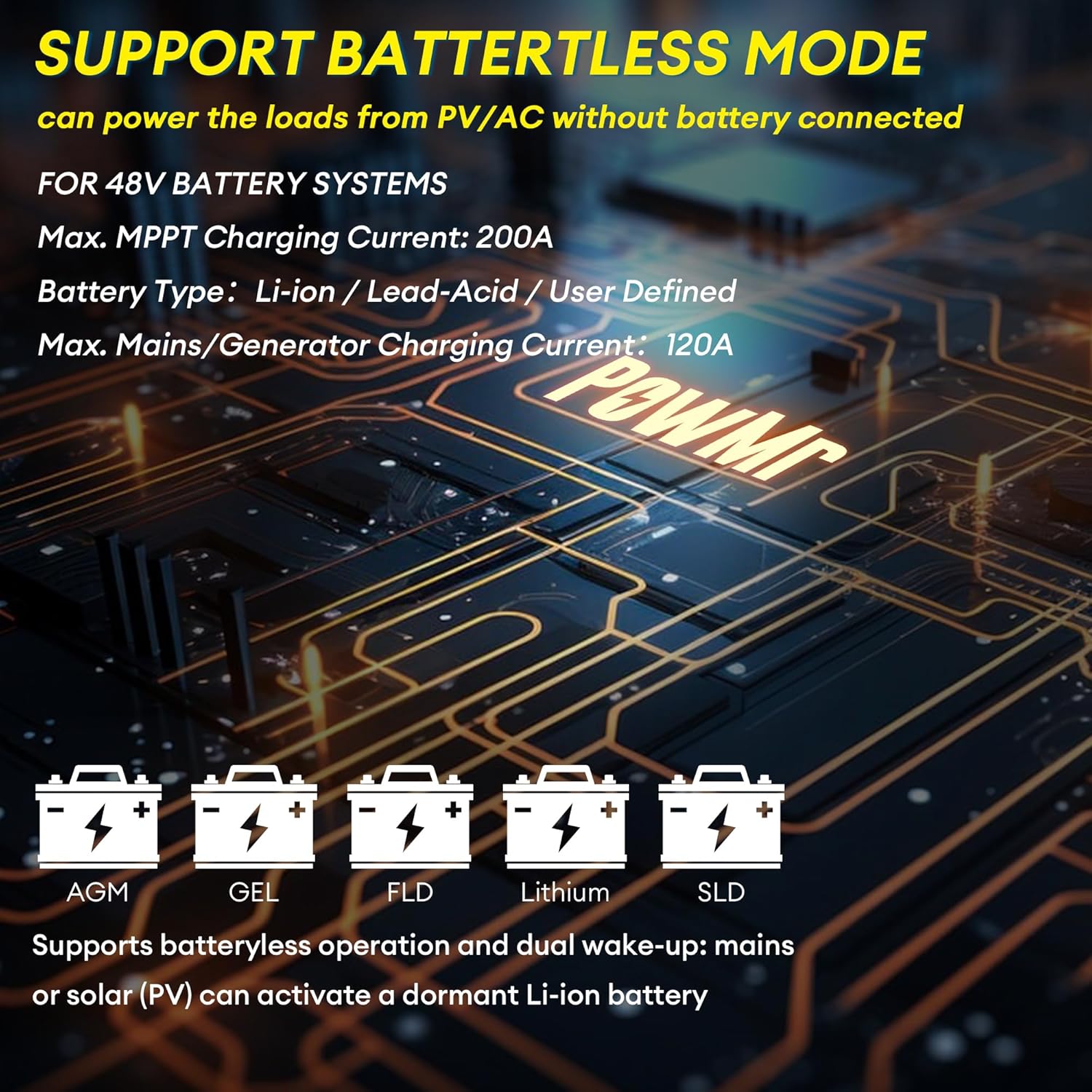
Figure 4.2: The inverter supports various 48V battery systems, including battery-less operation.
5. Parentah Operasi
5.1 Powering on / Pareum
- Pastikeun sadaya sambungan kabel aman sareng leres.
- Switch on the battery breaker, then the PV breaker.
- Flip the ON/OFF Rocker Switch (4) to the 'ON' position.
- Switch on the AC INPUT Breaker (15).
- To power off, reverse the sequence: AC INPUT Breaker off, ON/OFF Rocker Switch off, PV breaker off, battery breaker off.
5.2 Layar LCD sareng Setélan
The large LCD display (1) provides real-time energy visualization and system status. Use the touchable keys (3) to navigate menus and adjust settings. Refer to the detailed settings section in the full user manual for specific parameter configurations, including:
- Battery charging parameters (voltage, ayeuna)
- Kaluaran voltage jeung frékuénsi
- Operating modes (e.g., Solar First, Utility First, Battery First)
- Time-of-Use (TOU) control for smart charging/discharging
5.3 Battery-Less Mode
The inverter supports battery-less operation, allowing it to power loads directly from solar PV and/or AC input without a connected battery. This mode is useful for specific applications or during battery maintenance. Ensure proper configuration through the LCD settings.
6. Pangropéa
Pangropéa rutin ngajamin umur panjang sareng kinerja optimal inverter anjeun.
- beberesih: Periodically clean the inverter's exterior and ventilation openings to prevent dust buildup, which can impede cooling. Use a dry, soft cloth.
- Sambungan: Annually inspect all electrical connections for tightness and signs of corrosion. Re-tighten if necessary.
- Lingkungan: Ensure the installation environment remains within specified temperature and humidity ranges.
- Firmware: Pariksa produsén urang website for any available firmware updates. Firmware updates can improve performance and address known issues.
WARNING: Always disconnect all power sources before performing any cleaning or inspection.
7. Cara ngungkulan
Bagian ieu nyayogikeun solusi pikeun masalah umum. Pikeun masalah anu teu didaptarkeun di dieu, hubungi dukungan palanggan.
| Masalah | Mungkin Cukang lantaranana | Solusi |
|---|---|---|
| Inverter does not power on | No battery connection or low battery voltage; DC breaker off; ON/OFF switch off. | Pariksa sambungan batré jeung voltage; ensure DC breaker is on; turn ON/OFF switch to 'ON'. |
| Taya kaluaran AC | Overload; short circuit; AC output breaker tripped; inverter fault. | Reduce load; check for short circuits; reset AC output breaker; check LCD for error codes. |
| PV input not charging batteries | PV voltage too low or too high; PV polarity reversed; PV breaker off; MPPT fault. | Pariksa PV voltage and polarity; ensure PV breaker is on; check LCD for PV error codes. |
| Unstable output in parallel mode | Incorrect parallel communication wiring; mismatched firmware versions; incompatible settings. | Ensure only one parallel communication cable is used between units. Verify all inverters have the same, latest firmware version. Check parallel settings on each inverter. Contact support if issues persist. |
| Inverter displays error code | Internal fault; external condition (e.g., over-temperature, over-voltagjeung). | Refer to the full manual's error code section for specific meanings and solutions. Address environmental conditions if applicable. |
8. Spésifikasi
| Parameter | Nilai |
|---|---|
| Ngaran modél | BI-POW-SunSmart 12KP |
| Dipasang Output Kakuatan | 12000W (12KW) |
| Daya Puncak | 24000W |
| Dipeunteun Kaluaran Voltage | 120/240Vac (Split-Phase/Single-Phase) |
| Batré Voltage | 48V |
| Daya Input PV maksimum | 6600W |
| Maksimum PV Input Voltage | 500V DC |
| Maksimum PV Input Ayeuna | 22A |
| PV Starting Voltage | ≥150V |
| MPPT Muatan Ayeuna | Dual 100A (Max 200A total) |
| Max. Mains/Generator Charging Current | 120A |
| Palabuhan Komunikasi | RS485, CAN, USB |
| Ukuran (L × W × H) | 24.41 × 17.52 × 5.12 inci (62 × 44.5 × 13 cm) |
| Beurat | 59.5 lbs (27 kg) |
| Peunteun panyalindungan | IP20 (pamakéan jero rohangan) |
9. Garansi jeung Rojongan
For warranty information, please refer to the documentation provided with your purchase or contact PowMr customer service. For technical support, troubleshooting assistance, or inquiries regarding parts and service, please visit the official PowMr websitus atanapi ngahubungan saluran rojongan customer maranéhanana.
Sumberdaya Online:
- PowMr Store on Amazon: Visit PowMr Store


