Bubuka
This manual provides detailed instructions for the setup, operation, maintenance, and troubleshooting of your GravaStar Mercury V60 Magnetic Gaming Keyboard. Designed for precision and speed, this keyboard features Hall Effect switches, an 8000Hz polling rate, and extensive customization options to enhance your gaming and typing experience.
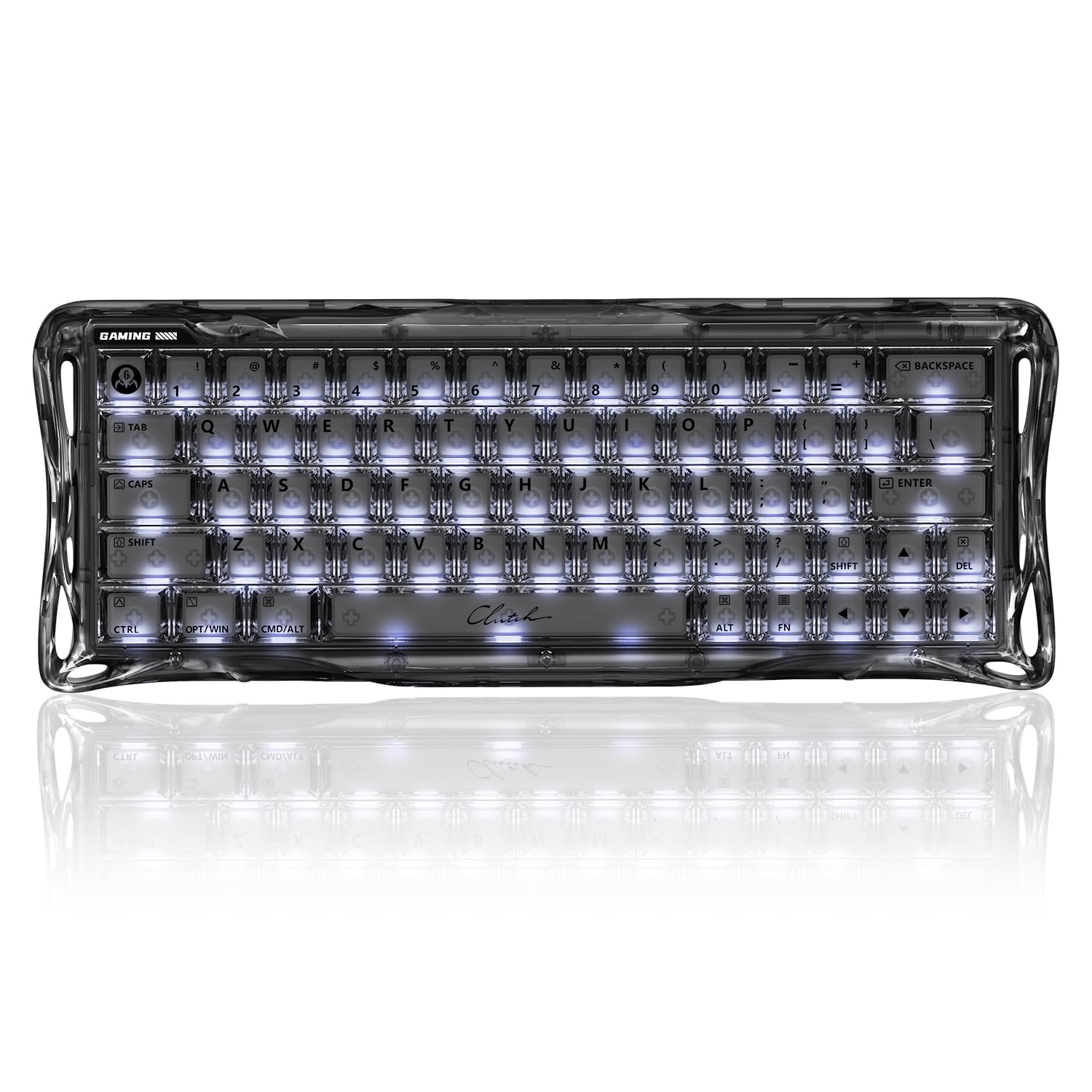
The GravaStar Mercury V60 Magnetic Gaming Keyboard, showcasing its unique design and vibrant backlighting.
Disetél
Eusi pakét
Sateuacan anjeun ngawitan, pastikeun sadaya item aya dina bungkusan:
- Mercury V60 Gaming Hall Effect Keyboard
- UFO Magnetic Switches (x4)
- Dust Cover Bag
- Kabel USB
- Sikat beberesih
- Kain beberesih
- Brand Stickers
- Pindah Puller
- Keycap Puller
- Manual pamaké

All components included with the GravaStar Mercury V60 keyboard.
Nyambungkeun kibor
The GravaStar Mercury V60 connects via USB-C. Use the provided USB cable to connect the keyboard to an available USB port on your computer (PC, Laptop, or Gaming Console). No additional drivers are typically required for basic functionality.
Parentah Operasi
Ultra-Precision Magnetic Switches
The keyboard features GravaStar UFO Magnetic Switches, offering 0.005mm precision and adjustable actuation from 0.005mm to 3.5mm. This allows for fine-tuning key sensitivity to match your preferences.

Anatomy of the UFO Magnetic Switch, highlighting its precision and magnetic flux.
Laju Polling 8000Hz
The V60 operates with a native 8000Hz polling rate and 256kHz key-position scanning, reducing latency to 0.125ms for rapid response times.
Dynamic Rapid Trigger & Last Keystroke Prioritization (LKP)
Dynamic Rapid Trigger allows keys to reset the moment you lift your finger, enabling faster repeated inputs. LKP ensures that only the last pressed key is registered, preventing unintended inputs during quick directional changes.
Controller Mapping & Analog Control
Each key can detect press depth, allowing for analog simulation. This feature enables mapping keys to mimic controller inputs like throttles or steering wheels for enhanced control in compatible games.

Keyboard profiles demonstrating customizable key layouts for different gaming scenarios.
Premium Build & Silent Acoustics
The V60 features a full-transparent chassis and a 4-layer acoustic foam internal structure to minimize vibrations and hollow sounds, providing a consistent typing experience.

Internal structure of the keyboard, showing the layers designed for acoustic performance.
Hot-Swappable & Customizable
The magnetic Hall Effect PCB is fully hot-swappable, allowing for switch replacement without soldering. It is compatible with select magnetic switches from TTC and Gateron.
Kontrol Lampu RGB
The keyboard features customizable RGB backlighting. Use the following key combinations to adjust lighting effects:
- Fn + \|: Cycle through Backlight Modes
- Fn + Tab: Switch Colors
- Fn + ← / →: Adjust Speed
- Fn + ↑ / ↓: Saluyukeun Caang

Visual guide for controlling RGB backlight modes, colors, speed, and brightness.
Video Produk Resmi
Pidéo resmi casing the GravaStar Mercury V60 HE Gaming Keyboard in Onyx Crystal, demonstrating its features and aesthetics.
Pangropéa
Ngabersihan kibor
To maintain optimal performance and appearance, regularly clean your keyboard. Use the provided cleaning brush and cloth to remove dust and debris from between the keycaps and the chassis. For stubborn dirt, a slightly damp cloth (water only) can be used, ensuring no liquid enters the keyboard. Always disconnect the keyboard before cleaning.
Ngaleupaskeun Keycap sareng Switch
Use the provided keycap puller to carefully remove keycaps. For switch replacement, use the switch puller to gently extract the magnetic switches. Ensure proper alignment when reinserting switches and keycaps to prevent damage.
Pamérésan masalah
Masalah konektipitas
- Keyboard not recognized: Pastikeun kabel USB-C nyambung pageuh kana kibor sareng komputer anjeun. Cobi port atanapi kabel USB anu sanés.
- Sambungan intermiten: Check for any physical damage to the cable or ports. Avoid using unpowered USB hubs.
Key Functionality Problems
- Konci henteu ngabales: Ensure the switches are properly seated. If hot-swapping, verify compatibility.
- Incorrect input: Check for any custom key bindings or profiles that might be active.
Masalah cahaya RGB
- Lampu teu jalan: Verify that the lighting is enabled and brightness is not set to minimum using the Fn key combinations.
- Pencahayaan anu teu konsisten: Pastikeun firmware kibor parantos mutahir.
Kustomisasi Software
For advanced customization, including actuation point adjustment, rapid trigger settings, and key remapping, visit the official GravaStar web-based application at hub.gravastar.com. This application requires a Chrome browser for full functionality and will prompt for hardware access.

The GravaStar web-based application for advanced keyboard settings and customization.
spésifikasi
| Fitur | Rincian |
|---|---|
| merek | Gandabah |
| Nomer modél | GS V60 |
| Alat nu cocog | Konsol Kaulinan, Laptop, PC |
| Téhnologi konektipitas | USB-C |
| Katerangan kibor | 60% perenah |
| Dianjurkeun Mangpaat | Business, Everyday Use, Gaming, Video Editing |
| Fitur husus | 8000Hz Polling Rate, Backlit, Hall Effect Switch, Rapid Trigger |
| Warna | Onyx Crystal |
| Lampu tukang kibor | RGB |
| Ukuran produk (L x W x H) | 11.5 "L x 6.1" W x 1.8" H |
| Jumlah konci | 61 |
| Sumber Daya | USB Powered |
| Pindah Tipe | liniér |
| Tata perenah kibor | QWERTY |
| Mechanical Keyboard Switch Model | Balé Pangaruh |
| Bahan Kandang | palastik |
Garansi
The GravaStar Mercury V60 Magnetic Gaming Keyboard comes with a 1 Taun Produsén Garansi. Please retain your proof of purchase for any warranty claims. For detailed terms and conditions, refer to the official GravaStar websitus atanapi ngahubungan rojongan customer.
Ngarojong
For further assistance, product updates, or to explore other GravaStar products, please visit the official GravaStar Store or contact their customer support channels.
- GravaStar Store: Visit the GravaStar Store on Amazon
- Web-based Software: hub.gravastar.com