


sobat Smart Colokkeun Mini

Panjelasan Produk
Friend' Smart Plug Mini mangrupikeun adaptor anu dikontrol jarak jauh.
Smart Plug Mini ngawas pamakean daya sareng ngamungkinkeun pangguna pikeun langsung ngaktipkeun sareng mareuman alat naon waé ti sakumna dunya - atanapi tina dipan.
Smart Plug Mini sayogi dina sababaraha vérsi.
Tindakan pancegahan
- Ulah miceun labél produk sabab ngandung émbaran penting.
- Cegah ngahurungkeun beban maksimum anu sering dihurungkeun atanapi dipareuman, pikeun ngajaga umur panjang pikeun Smart Plug.
- Ati-ati henteu aya cairan anu lebet kana Smart Colokkeun sabab éta tiasa ngarusak peralatanna.
- Upami alatna dianggo salaku sinyal amplangkung saé, punten pasihkeun alatna di antawis alat sentral sareng sénsorna.
Ngamimitian
- Sambungkeun Smart Plug Mini kana stop kontak listrik.
- Smart Plug Mini ayeuna bakal ngamimitian milarian (dugi ka 15 menit) pikeun gabung jaringan Zigbee.
- Pastikeun jaringan Zigbee kabuka pikeun ngagabung sareng alat sareng bakal nampi Smart Plug Mini.
- Nalika Smart Plug Mini milarian jaringanna, tombol LED kedip-kedip beureum.
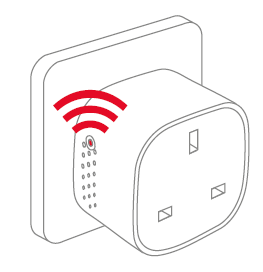
CATETAN: Mencét tombol ngahurungkeun Smart Colokkeun Mini on. Lampu LED mimiti hurung beureum sareng héjo sakaligus. Ieu tiasa nyababkeun warna némbongan salaku oranyeu/konéng, nalika alat milarian jaringan. - Nalika tombol LED lirén kedip-kedip, Smart Plug Mini parantos suksés ngagabung kana jaringan Zigbee.
panempatan
- Pasang Smart Plug di jero rohangan dina suhu antara 0-50°C.
- Upami alatna dianggo salaku sinyal amplangkung saé, punten pasihkeun alatna di antawis alat sentral sareng sénsorna.
Ngareset
Ngareset diperlukeun upami Anjeun hoyong nyambungkeun Smart Colokkeun Mini Anjeun ka gateway sejen, lamun kudu ngalakukeun reset pabrik pikeun miceun kabiasaan abnormal, atawa lamun kudu ngareset accumulative registers jeung log.
Léngkah pikeun ngareset
- Sambungkeun Smart Plug Mini kana stop kontak listrik.
- Pencet jeung tahan tombol dina alat.
- Tahan tombol handap dugi LED beureum ngagenclang teras-terasan, teras lepaskeun tombol na.

- Saatos releasinLamun tombolna dipencet, LED beureum bakal tetep hurung salila 2-5 detik. Salila éta, alat teu kénging dipareuman atanapi dicabut tina colokan listrikna.
Modeu
Milarian GATEWAY MODE
- A LED beureum kedip-kedip unggal detik

MODE NORMAL
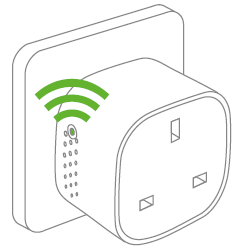
LED Héjo hartosna kaluaran Smart Plug aktip (relay dihurungkeun). Relay tiasa dihurungkeun sareng dipareuman ku ngadorong tombol LED.
MODE OFF
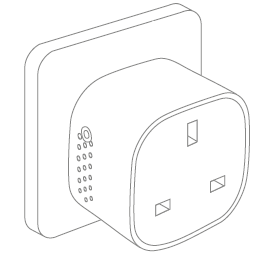
Nalika teu aya lampu dina tombol LED, éta hartosna yén relay pareum (teu aya kaluaran). Relay tiasa dihurungkeun sareng dipareuman ku ngadorong tombol LED.
Pananjung kasalahan
• Dina hal gagalna kakuatan, alat bakal balikkeun sorangan ka status on / off nya éta saméméh kakuatan gagal.
• Dina hal sinyal goréng atawa lemah, ngarobah lokasi Smart Colokkeun Mini atawa gateway Anjeun.
• Lamun pilarian pikeun gateway geus timed kaluar, pencét pondok dina tombol LED bakal balikan deui.
Inpo sejenna
• The Smart Colokkeun Mini dipeunteun pikeun 10 A beban continious, jeung 16 A (~ 3500 W) beban waktos pondok.
• Ieu bakal otomatis pindah kaluar lamun beban ngaleuwihan 16 A atawa suhu internal meunang teuing tinggi.
• Dina hal gagalna kakuatan, alat bakal balikkeun sorangan ka status on / off nya éta saméméh kakuatan gagal.
Pembuangan
Buangkeun produk kalayan leres dina akhir umur. Ieu runtah éléktronik anu kedah didaur deui.
Sertifikasi CE
Tanda CE anu ditempelkeun kana produk ieu negeskeun patuh kana Parentah Éropa anu lumaku pikeun produk sareng, khususna, patuh kana standar sareng spésifikasi anu harmonis.
LUCU jeung DIREKTIF
• Radio Equipment Directive (RED) 2014/53 / EU
• Low Voltage Diréktif (2014/35 / EU)
• Pitunjuk RoHS 2015/863 / EU amandemen 2011/65 / EU
Sertifikasi séjén
Zigbee Home Automation 1.2 bijil
Sadaya hak disimpen.
béntés henteu tanggel waler pikeun kasalahan naon, anu tiasa dipidangkeun dina manual ieu. Salajengna, bénten ngagaduhan hak pikeun ngarobih perangkat keras, parangkat lunak, sareng / atanapi spésifikasi anu diwincik di dieu iraha waé tanpa aya bewara, sareng réncang sanés komitmen pikeun ngamutahirkeun inpormasi anu aya di dieu. Sadaya mérek dagang anu didaptarkeun di dieu dipimilik ku pamilik masing-masing.
Dokumén / Sumberdaya
 | Smart Colokkeun Mini |
Rujukan
- frient - sensor, alarem, colokan pinter - perawatan imah jeung kaamananwww.friend.com
- Manual pamakémanual.tools
The socket SH-P01 stopped working after about a year of use. Does not start despite resetting. The LED remains completely dark. Also the same thing happened with SH-P01E about 2 years ago.
Replaced with new SH-P01 sockets. Load Max230VAC/ 1A. The new sockets work flawlessly in the same WiFi network. The devices have a CE mark, but not from an inspection body
nomer?
Pistorasia SH-P01 lakkasi toimimasta noin vuoden käytön jälkeen. Ei käynnisty resetoinnista huolimatta. LED pysyy täysin pimeänä. Myös sama tapahtui SH-P01E noin 2-vuotta sitten.
Korvattu uusilla SH-P01 pistorasioilla. Kuomitus Max230VAC/ 1A. Uudet pistorasiat toimivat samassa WiFi-verkossa moitteettomasti. Laitteissa on CE-merkintä, mutta ei tarkastuslaitoksen
numeroa ?
Replaced with new SH-P01 sockets. Load Max230VAC/ 1A. The new sockets work flawlessly in the same WiFi network. The devices have a CE mark, but not from an inspection body
nomer?
Pistorasia SH-P01 lakkasi toimimasta noin vuoden käytön jälkeen. Ei käynnisty resetoinnista huolimatta. LED pysyy täysin pimeänä. Myös sama tapahtui SH-P01E noin 2-vuotta sitten.
Korvattu uusilla SH-P01 pistorasioilla. Kuomitus Max230VAC/ 1A. Uudet pistorasiat toimivat samassa WiFi-verkossa moitteettomasti. Laitteissa on CE-merkintä, mutta ei tarkastuslaitoksen
numeroa ?
Why has my Smart Plug Mini stopped working with a dark LED, and why is there no inspection body number next to the CE mark?
Based on the frient Smart Plug Mini manual, if the LED remains completely dark and the device does not respond to a factory reset, it likely indicates a hardware failure or a triggered safety cutoff. Please note the following regarding your SH-P01 model:
Since your new units work on the same network with the same 1A load, and the old units remain unresponsive, we recommend contacting frient support or your retailer for warranty claims, as the manual does not provide further repair steps for a non-responsive LED.
Read the full Q&A page