


msi TPM 2.0 Modul Platform Dipercanten
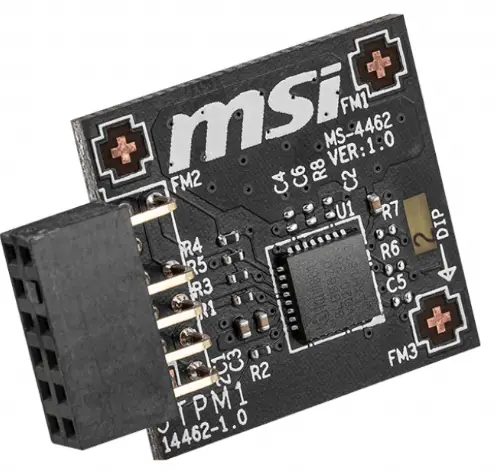
Ngeunaan Modul Platform Dipercaya (TPM)
Trusted Platform Module (TPM) mangrupikeun téknologi kaamanan anu ngagunakeun kriptografi pikeun nyimpen inpormasi penting sareng kritis dina PC. TPM tiasa ngajagi data penting anjeun tina malware atanapi serangan jahat ku cara ngahasilkeun sareng validasi konci enkripsi.
Leuwihview tina kartu TPM 2.0
spésifikasi
| Chipset | SLB 9672 VU 2.0 FW 15.22 |
| Panganteur | SPI |
| Faktor Bentuk | 0.5079 inci x 0.8469 inci (12.90 x 21.51 mm) |
| OS | * Ngarojong Windows® 11, Windows® 10 |
motherboards dirojong
| Intel® | AMD |
| Intel® 400 séri | runtuyan AMD X570 (SPI) |
| Intel® 500 séri | runtuyan AMD B550 |
| Intel® 600 séri | runtuyan AMD A520 |
| Intel® 700 séri | runtuyan AMD X670 |
| runtuyan Intel® W790 | runtuyan AMD B650 |
Masang kartu TPM 2.0 kana Motherboard
Selapkeun kartu TPM 2.0 kana header pin TPM dina motherboard Anjeun.
| Pin | Ngaran Sinyal | Pin | Ngaran Sinyal |
| 1 | Kakuatan SPI | 2 | SPI Chip Pilih |
| 3 | Master In Slave Out (Data SPI) | 4 | Master Out Slave In (Data SPI) |
| 5 | Ditangtayungan | 6 | Jam SPI |
| 7 | taneuh | 8 | SPI Reset |
| 9 | Ditangtayungan | 10 | Henteu Pin |
| 11 | Ditangtayungan | 12 | Ngaganggu Request |

Aktipkeun TPM via BIOS Pikeun platform AMD
-
- Pencét pikeun ngasupkeun program BIOS Setup dina ngamimitian sistem.
- Pencét pikeun asup kana Modeu Advanced.
- Pindah ka Setélan> Kaamanan> Komputasi Dipercanten.
- Setel Rojongan Alat Kaamanan ka [Aktipkeun].

- Setel switch AMD fTPM ka [AMD CPU fTPM Dinonaktipkeun]

- Setel Pilih Alat ka [TPM 2.0]

Pikeun platform Intel®
-
- Pencét pikeun ngasupkeun program BIOS Setup dina ngamimitian sistem.
- Pencét pikeun asup kana Modeu Advanced.
- Pindah ka Setélan> Kaamanan> Komputasi Dipercanten.
- Setel Rojongan Alat Kaamanan ka [Aktipkeun].

- Setel Pamilihan Alat TPM ka [dTPM].

Ngabersihkeun TPM ti mios
- Pencét pikeun ngasupkeun program BIOS Setup dina ngamimitian sistem.
- Pencét pikeun asup kana Modeu Advanced.
- Pindah ka Setélan> Kaamanan> Komputasi Dipercanten.
- Setel operasi Pending ka [TPM Hapus].

Ngabersihan TPM tina OS
-
- Ketik tpm.msc dina kotak teang gigireun ikon Start .
- Klik tpm.msc pikeun nuliskeun manajemén TPM.

- Klik Hapus TPM… dina Aksi

- Pencét Balikan deui nalika jandela muncul
Dokumén / Sumberdaya
 |
msi TPM 2.0 Modul Platform Dipercanten [pdf] Pituduh pamaké TPM 2.0 Modul Platform Dipercanten, TPM 2.0, Modul Platform Dipercanten, Modul Platform, Modul |


